Pandora, one of the original pioneers in music streaming, may not get the same spotlight as big players like Spotify and Apple Music in 2024, but it’s still a solid option for enjoying your favorite songs, albums, and stations. If you’re looking for a reliable music platform, Pandora remains a great choice for personalized listening.
What is Pandora?
Pandora is a music-streaming service that lets you access a vast library of albums, artists, playlists, and even podcasts. What sets it apart is its focus on curating music for you through its “stations.” As you listen, Pandora gets better at learning your musical tastes and starts serving up tracks that align with your preferences. Essentially, the more you use it, the smarter it gets at figuring out what you like!
Plus, you can create and share your own playlists, and with paid plans, even download music for offline listening—though that’s only available on mobile devices.
How much does Pandora cost?
Pandora offers three tiers:
- Free plan: You can listen to music, but you’ll get ads and limited features—no playlist creation, sharing, or offline listening.
- Pandora Plus ($5/month or $55/year): This removes ads and lets you download music, skip tracks freely, and enjoy a more seamless experience.
- Pandora Premium ($11/month or $121/year): With Premium, you unlock the full experience: playlist creation, sharing, offline listening, and more. They also offer discounts for families, students, and military personnel. The Family Plan ($18/month) supports up to six users and even creates a special shared playlist called “Our Soundtrack,” blending everyone’s tastes.
Both Pandora Plus and Premium come with free trial periods (30 days and 60 days, respectively), so you can test them out before committing.
How do you use Pandora?
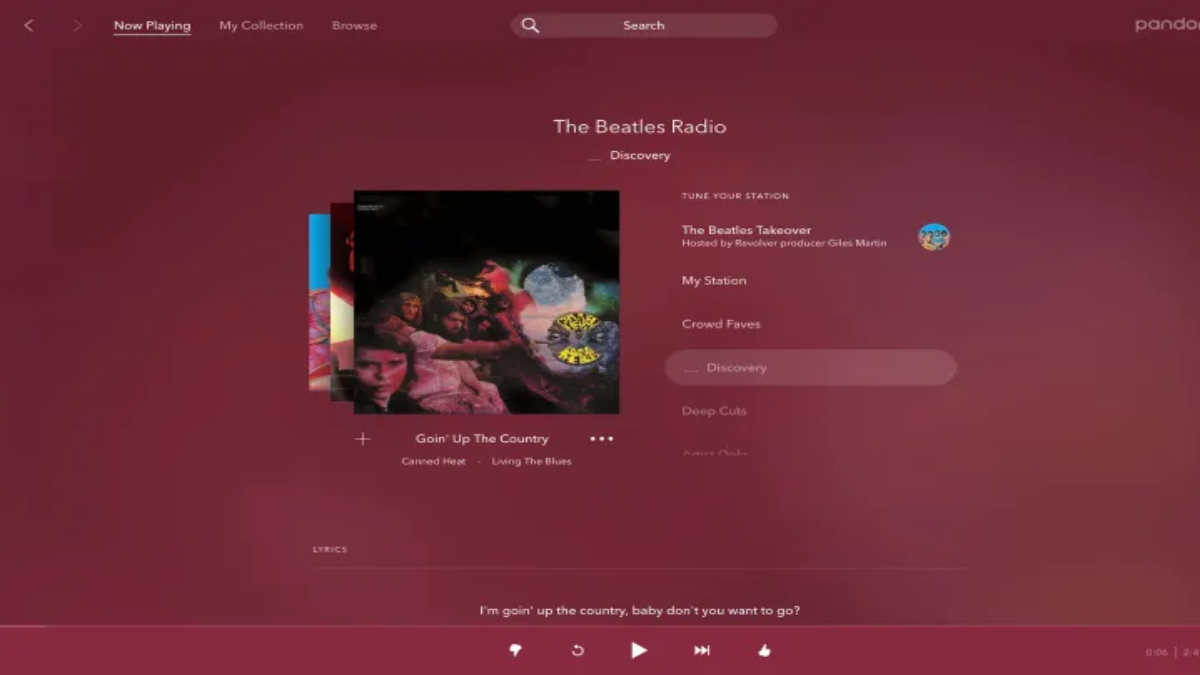
We tried Pandora out on a MacBook and an iPhone, using both the desktop and mobile apps. When you first sign in, you’ll land on your My Collection page, where you can search for songs, albums, or podcasts. Pandora’s real magic happens through its algorithmically created stations that get better over time, especially if you give “thumbs up” to the songs you love.
The interface is divided into three main sections:
- Now Playing: Shows music tailored to your tastes, based on what you’ve already listened to.
- My Collection: Where all your saved artists, albums, songs, playlists, and podcasts live.
- Browse: Discover new music through categories like “Top Artists,” “Moods,” and “Trending.”
While the desktop app can feel a bit clunky compared to Spotify or Apple Music, it’s still easy enough to navigate. The mobile app is similar but more streamlined for use on smaller screens. Pandora’s mobile app also lets you connect to smart devices like Alexa and Apple HomePod for hands-free control.
How’s the audio quality?
Pandora’s audio quality is good but not top-tier. It doesn’t offer Hi-Res Audio like some competitors (e.g., Apple Music, Tidal, or Qobuz), but for casual listeners, its AAC+ and MP3 formats do the job.
The quality depends on your subscription:
- Free users: 64Kbps AAC+
- Paid subscribers: Options include Low (32Kbps), Standard (64Kbps), and High (192Kbps MP3) settings.
How to download music from Pandora?
Downloading music for offline listening is only available on paid plans, and you can only do it through the mobile app—so no direct downloads to your computer. To download, just tap the song or album, hit the “More” icon, and select “Download.” You’ll know it’s ready for offline play when you see a green arrow next to the track.
Where can you use Pandora?
Pandora is accessible across several platforms, including:
- Desktop apps for Windows and macOS
- Mobile apps for iOS and Android
- Smart devices like Amazon Fire TV and Google TV
What’s missing from Pandora?
While Pandora is great for personalized music, there are a few drawbacks. It doesn’t offer Hi-Res Audio, lacks video content (which many modern streaming platforms now offer), and only allows mobile downloads. Perhaps the biggest shortcoming, however, is the somewhat outdated and cluttered user interface, which could benefit from a design overhaul to improve usability.
In short, Pandora remains a great option for listeners who want personalized radio-like stations and easy-to-use music streaming. However, if you’re a stickler for audio quality or prefer a more modern interface, you might find better options elsewhere.