How accessibility tools and Gemini empower students towards independence


A school division in Canada is making classrooms more accessible with the use of Chromebooks and Gemini technology.
Across Canada, schools are integrating AI and camera capabilities to assist students with physical disabilities in working autonomously. Previously reliant on cumbersome switches, students can now manage their computers by simply moving their heads. This technological advancement allows them to complete their schoolwork independently, preventing them from lagging behind and helping them focus on future aspirations, such as game design.
In celebration of Global Accessibility Awareness Day, we highlight how schools in Alberta, Canada, have removed barriers for students by implementing Face control—a feature present in every Chromebook—and custom extensions developed through Gemini, accessible via Gemini for Education. Darren Maltais, the technology integration facilitator, shares how these innovations have replaced outdated switch systems, granting students with disabilities newfound independence at school.
The Black Gold School Division serves pre-K to grade 12 students over 32 schools, always seeking technology that enhances learning for their 14,000 students. Occasionally, technology not only improves learning but transforms it entirely. This was the case with Face control, a ChromeOS accessibility feature built into every Chromebook.
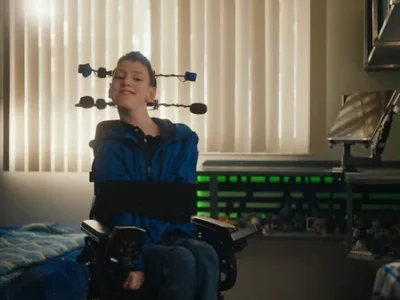
For Liam Alphonse Dansereau, a creative and intellectually advanced seventh-grader with mobility challenges, participating in class used to involve a complicated setup. Previously, Liam depended on physical switches to operate his computer. This setup required disconnecting from his wheelchair to connect to his laptop, and each action, like clicking a link, was tedious. Communicating required a scribe for every word and manually writing numbers.
Upon learning about Face control on Chromebooks, it was clear this could revolutionize learning for Liam and others in our district. I was eager to implement it for Liam. The technology was transformative, utilizing the Chromebook’s camera to let Liam scroll and navigate freely by moving his head. This innovation grants him freedom; he no longer needs a scribe for every word or to engage with cumbersome systems. Liam can now move his head to control his cursor, open assignments in Google Classroom, activate voice typing, and complete his work independently.
To enhance Liam’s independence, I used Gemini to create a custom extension that identifies questions on platforms like Khan Academy. This allows Liam to press a single button on his screen instead of scrolling extensively.
With Face control on Chromebooks, barriers are being dismantled, creating equal opportunities. Students who previously struggled with writing can now craft full-page stories. For Liam, barrier-free learning means he can express his humor and curiosity in real time with his peers. Since adopting Face control, Liam has taken charge of his learning, and critically, new future possibilities have emerged. He is now enthusiastic about pursuing web or video game design, armed with the digital independence to start building those skills today.